ATS-Friendly Résumé Format: The Rules That Matter in 2026
Most résumés are rejected by software before a human reads them. Here are the ATS-friendly formatting rules that actually matter, and the myths you can ignore.
Before most of your applications reach a human, they pass through an applicant-tracking system (ATS): software that parses your résumé into structured data and ranks it. If the parser cannot read your résumé cleanly, you can be filtered out or down-ranked no matter how strong your experience is.
The fix is not complicated, but it is full of myths. This guide covers the ATS formatting rules that genuinely matter in 2026, the ones that do not, and how to check that your résumé parses cleanly.
What an ATS actually does
An ATS ingests your file and tries to extract structured fields: your name, contact info, work history, education, skills, dates. It then matches that data against the job and ranks you among applicants. Two things sink you: a layout the parser cannot read in the right order, and missing or mismatched keywords for the role.
This guide is about the first problem, parsing. (For the keyword side, see how to tailor your résumé to a job description.)
The rules that actually matter
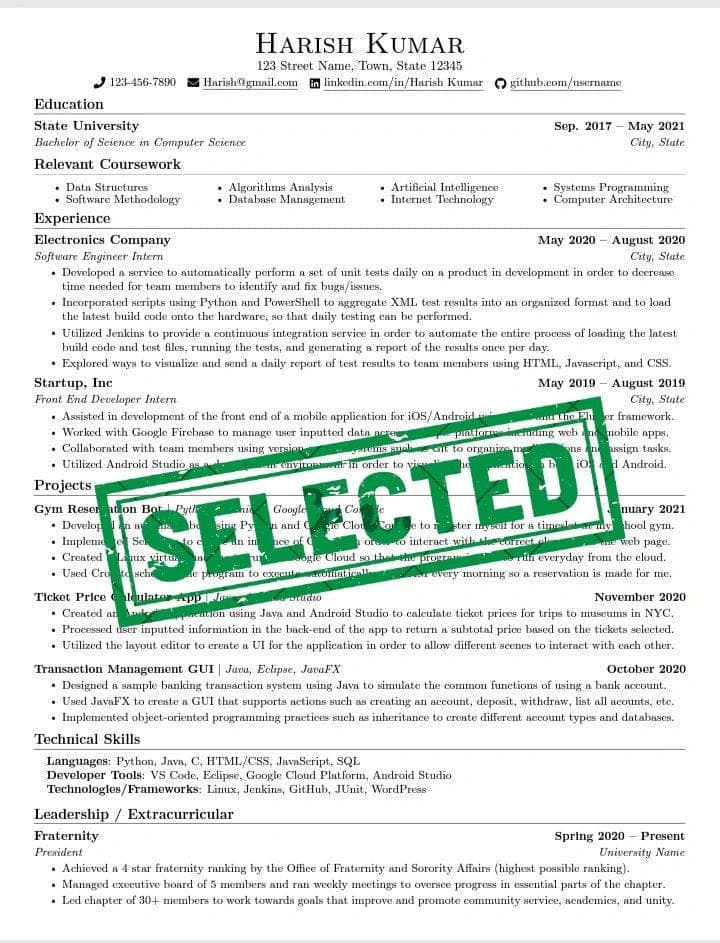
Use a single-column layout
Multi-column layouts are the number-one cause of garbled parsing. The ATS reads left to right, top to bottom, and columns scramble that order, mixing your skills into your job history. Keep everything in one column down the page.
Keep the text selectable
If you can highlight the text in your PDF with your cursor, the ATS can read it. If your résumé is an image or a heavily designed graphic, the parser sees nothing. Export from a word processor, not as a flattened image.
Use standard section headings
Name your sections what the parser expects: Experience (or Work Experience), Education, Skills, Summary. Creative headings like "Where I've Made Impact" can confuse the parser into missing the section entirely.
Put contact info in the body, not the header or footer
Some ATS parsers ignore content in document headers and footers. If your name, email, and phone live only up there, they can be dropped. Put them in the main body at the top of the page.
Skip tables, text boxes, icons, and photos
Tables and text boxes break reading order. Icons and photos carry no machine-readable text and can confuse parsing. A skills section as a simple list reads perfectly; the same skills in a table or graphic may not.
Use a standard, readable font and clear dates
Stick to common fonts and a consistent date format (for example, "Jan 2024 to Mar 2026"). Consistent dates help the parser build your timeline correctly.
Choose the right file type
A text-based PDF or a .docx is safest. Both preserve selectable text and parse reliably. Avoid exotic formats and avoid "print to image" PDFs.
The myths you can ignore
- "You must use a .txt résumé." No. A clean, text-based PDF or .docx parses fine and looks professional. Stripping all formatting is unnecessary.
- "Any design at all gets you rejected." Modest, single-column styling, bold headings, sensible spacing, is fine. It is columns, tables, and images that cause problems, not the existence of formatting.
- "Keyword density is a magic number." There is no secret percentage. Use the role's real keywords where they truthfully apply; do not stuff.
- "Recruiters reject AI-assisted résumés." They care about fit, not which tool helped you write. The danger is fabricated content, not assistance.
The deliberate exception: keep the artifact plain
It is tempting to make a résumé beautiful. Resist it. The résumé is the one place where plain wins, because plain is what parses. Save your design instinct for your portfolio. A single-column, clean, text-based résumé is not boring; it is the version that actually gets read, by the software and the human after it.
How to check your résumé parses cleanly
You can sanity-check by hand: open your PDF, try to select the text (if you cannot, neither can the ATS), and confirm the reading order makes sense top to bottom. For a faster, specific read, the free OyaPilot Résumé Score checks ATS-readiness and shows you the exact formatting and content issues to fix, with the full critique, not a blurred preview.
How OyaPilot keeps your résumé ATS-safe
Every résumé OyaPilot generates or tailors stays ATS-plain by design: single column, selectable text, standard headings, simple bullets, no tables, icons, photos, or header/footer contact info. You get the benefit of tailoring and strong wording without ever breaking the parser. Score your current résumé free to see where it stands, or start free to build and tailor ATS-safe résumés for every role.
Frequently asked questions
What is the best résumé format for ATS?
A single-column layout with selectable text, standard section headings (Experience, Education, Skills), contact info in the body, and no tables, columns, icons, or photos. Save it as a text-based PDF or .docx.
Should I use a PDF or Word document for an ATS?
Both work as long as the text is selectable. A text-based PDF or a .docx both parse reliably. Avoid image-based PDFs and unusual file formats.
Do ATS systems really reject résumés automatically?
ATS software does not usually auto-reject, but it ranks applicants, and a résumé it cannot parse cleanly gets ranked down or has key fields dropped, which can keep you from a human reviewer. Clean formatting protects against that.
Will a fancy résumé template hurt my chances?
If the template uses multiple columns, tables, text boxes, icons, or images, it can break ATS parsing. A simple, single-column template with modest styling is both ATS-safe and professional.
The bottom line
- An ATS parses and ranks your résumé before a human sees it; bad formatting gets you filtered out.
- The rules that matter: single column, selectable text, standard headings, contact info in the body, no tables or graphics.
- Ignore the myths about .txt-only résumés and "no design at all."
- Keep the artifact plain on purpose, because plain is what parses.
Make sure yours parses cleanly. Get your free résumé score, then build and tailor ATS-safe résumés for every application.
Free tool
See exactly why your résumé is or is not landing interviews.
Score your résumé free. The full critique, ATS-readiness and the fixable gaps, shown in seconds. No account needed.
OyaPilot Editorial
The team building OyaPilot
Written by the team building OyaPilot, the job-search copilot that surfaces only verified, real jobs and tailors résumés truthfully. We write from what we see in our own verified-source corpus and our work on ghost-job detection and ATS-safe résumés.
Our editorial standardsKeep reading
The Honest Guide to AI Job-Application Tools (2026)
Auto-apply tools promise hundreds of applications a day. Here's what they actually do, where they fall short, and how to choose one that lands interviews, not just applications.
Ghost Jobs: How to Spot a Fake Job Posting in 2026
Up to 1 in 5 job postings may never be filled. Learn what ghost jobs are, the seven signs that give them away, and how to check a posting before you apply.